
Translating a survey
Offer the same survey in Chinese, Malay, or Tamil from the survey editor.
You can translate respondent-facing copy into Singapore's other official
languages. English is always the source language. Respondents see a translated
survey when the widget is given a locale, or when a platform survey link
includes ?locale=. For the widget, useResolveLocale maps the browser
language (or your app's language setting) to the correct Confetti locale.
Widget translations require @opengovsg/confetti version 0.8.2 or later.
Older widgets still render the English survey and do not break.
Translations are entered by hand. There is no in-survey language switcher —
pick the language in your embed (typically with useResolveLocale) or on the
survey link.
Supported languages
| Code | Language | Role |
|---|---|---|
en | English | Source language (always on) |
zh | 中文 | Optional translation |
ms | Bahasa Melayu | Optional translation |
ta | தமிழ் | Optional translation |
Open the Translations tab
In the survey editor, choose Translations next to Edit survey.
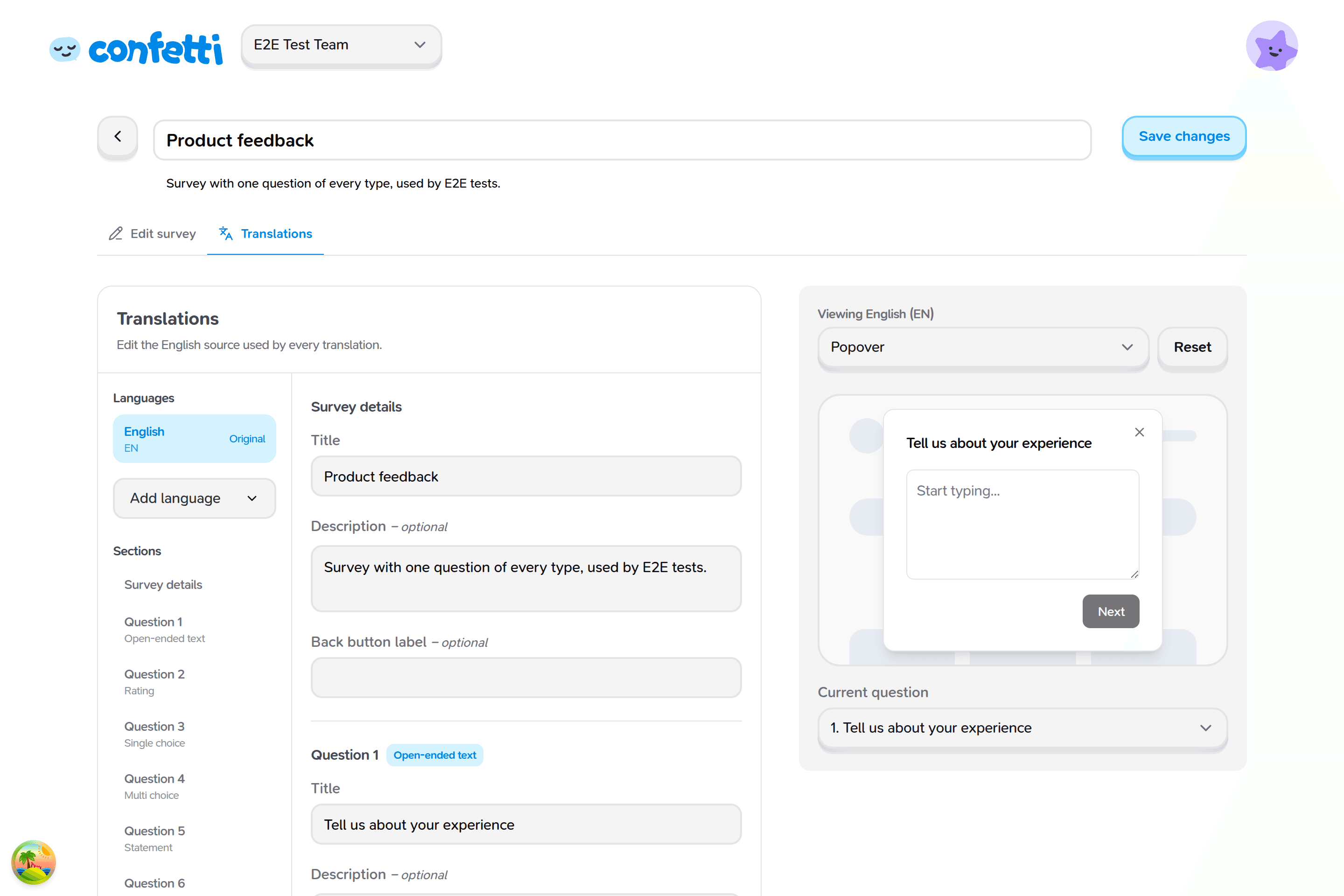
English stays available as Original. Use it to review or edit the source copy without leaving the tab. Changes you make on English write to the survey itself, not to a translation.
Add a language
Under Languages, open Add language and pick 中文, Bahasa Melayu, or தமிழ்.
The new language appears in the list with a coverage count (for example
4/12). A check mark appears when every translatable field for that language
is filled — or already covered by a built-in widget translation.
Translate each field
Select the language, then work through Survey details, each question, and Confirmation. Use Sections on the left to jump.
For every field you see:
- The English source on the left (read-only in this language).
- An input for the translation on the right.
- A status: Translated, Not translated, or Uses a built-in translation.
Leave a field blank to fall back to English. Some chrome — confirmation header, Close, Other, and a few placeholders — already has a built-in translation, so you can leave those blank unless you want custom wording.
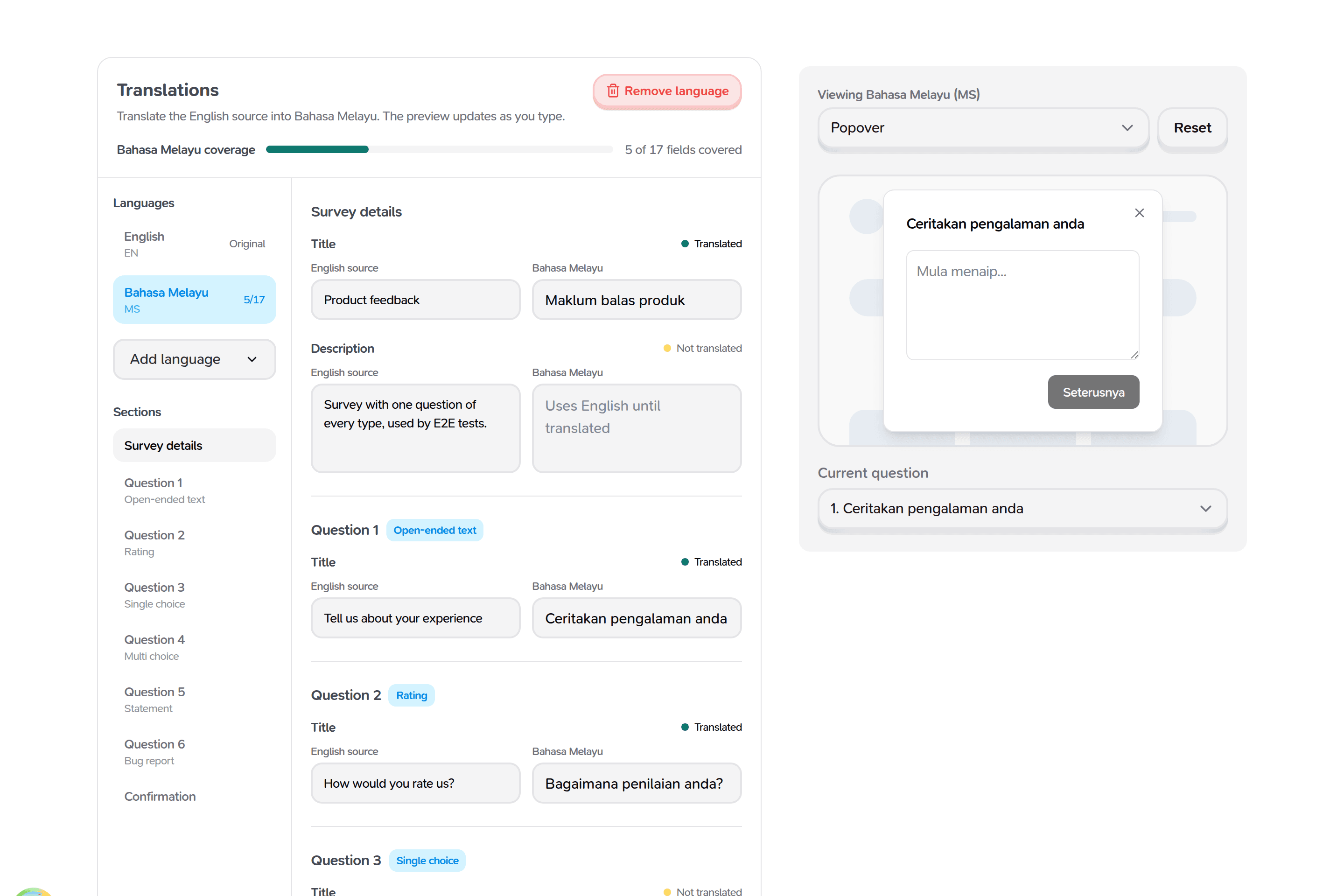
Optional English fields (description, choice descriptions, custom button labels) only appear here if the English source has a value.
For single-choice and multiple-choice questions, translate the label respondents read. The English choice value is unchanged: routing and recorded answers still use it.
Preview as you type
The preview on the right switches to the language you are editing and shows Viewing 中文 (ZH) (or Malay / Tamil). Click a section on the left to preview that question.
Save your translations
Click Save changes. Translations save with the rest of the survey — a save from Edit survey also keeps them.
Unsaved translations are lost if you leave the editor. Save before switching surveys or closing the tab.
Remove a language
Select the language, then Remove language. This deletes every translation in that language for the survey. It cannot be undone.
What respondents see
Untranslated fields fall back to English. Widget chrome such as Skip, Next,
Submit, Back, Close, Other, (optional), and validation errors is already
translated when you pass a locale, even if you never authored those strings.
Embedded widget
Pass locale on the template component (@opengovsg/confetti 0.8.2 or
later). The widget does not follow the browser language unless you pass
locale — use useResolveLocale to pick the right one:
import { PopoverConfetti, useResolveLocale } from '@opengovsg/confetti'

function Feedback() {
  const locale = useResolveLocale()

  return (
    <PopoverConfetti
      surveyId="<your-survey-id>"
      publishableKey="<your-publishable-key>"
      locale={locale}
    />
  )
}
Pass { preferred: i18n.locale } when your app already knows the language.
Pass { explicit: searchParams.get('locale') } for a URL override. To always
show one language, set locale="zh" and skip the hook.
locale accepts 'en' (the default), 'zh', 'ms', or 'ta'. See
Embedding the widget.
Platform survey link
Append locale to the shareable link. This value is used only to pick the
language — it is not stored as response metadata.
https://confetti.gov.sg/cfti/<surveyId>?locale=zhSee Platform surveys.
Was this page helpful?